Overview
SwarmForge (v1.3.0) is an open-source 3D isometric automated robotic factory and swarm-intelligence simulation game written in native Rust. Coordinating dozens of autonomous robots inside a multi-floor factory requires balancing spatial pathfinding, task allocation, battery energy, congestion avoidance, and emergency response to hazards such as localized fires. SwarmForge turns those multi-agent systems challenges into an interactive strategy and simulation game: players place fabrication cells, charging pads, and suppression towers across stacked factory floors, unlock swarm-scaling technologies, dispatch builder, hauler, and cheer drones, and watch real-time isometric factory production unfold. Under the hood, deterministic collision-aware pathfinding, tech-tree throughput multipliers, hazard mitigation, and SQLite WAL save persistence ensure smooth gameplay and reproducible multi-agent behavior. Source code, documentation, and companion apps are listed at https://crvscience.com/apps.
1. Real-World Context & Why This Problem Matters
Turning Multi-Agent Robotics Into an Isometric Strategy Game
Real-world automated warehouses and robotic assembly plants face a classic distributed-systems puzzle: even when each individual robot obeys simple local rules, dozens of mobile units sharing tight aisles, vertical stairwells, and charging stations quickly run into traffic jams, deadlocks, battery starvation, and uneven workloads. Adding unexpected disruptions—such as equipment overheating or localized factory fires—tests whether a swarm can reprioritize tasks and recover throughput before production stalls across floors.
Large-scale swarm coordination[1] and heuristic obstacle-avoiding pathfinding[2] form the backbone of modern robotics and warehouse automation, yet their emergent trade-offs are easiest to grasp when you can build a factory floor yourself and watch bottlenecks form in real time. SwarmForge brings multi-floor factory automation, swarm tech progression, and hazard management together in a playful, responsive 3D isometric game.
Think of SwarmForge like conducting a miniature robotic orchestra across three stacked stages: your placement geometry sets the physical tempo, technology unlocks expand the ensemble's speed and battery endurance, and automated suppression towers keep a single spark from silencing the floor.
Multi-Floor Factory Layouts, Specialized Bots, and Live Hazards
SwarmForge (v1.3.0) renders stacked industrial floors using custom WGSL isometric shaders and immediate-mode UI controls, backed by SQLite write-ahead-log (WAL) persistence so large factory layouts save and reload cleanly without stuttering. Written across 13 modular Rust source files with zero heavyweight external game-engine bloat, it runs smoothly offline on standard desktop hardware.
Unlike traditional factory games that rely solely on static conveyor belts, SwarmForge places autonomous mobile robots at the heart of every production chain. Builder drones construct and repair modules across floors, hauler drones ferry intermediate parts along collision-free aisles and vertical stairwells, and cheer drones circulate through busy work zones to boost nearby unit morale and cycle speed. Every design decision—from where to place charging pads relative to high-demand assemblers to how many fire-suppression towers cover a multi-tier smelting bay—directly reshapes traffic flow, energy balance, and resilience under stress.
2. Conceptual Design & How SwarmForge Works
Pathfinding, Assembly Chains, Disasters, and Isometric Rendering
SwarmForge separates its multi-agent simulation cleanly from its GPU presentation layer. Core world state, five-tier product blueprints, stacked floor grids, and robot/module definitions live in model.rs and floors.rs. Autonomous movement and collision resolution—keeping builder and hauler robots clear of fabrication cells, conveyors, and stairwells—are implemented in navigation.rs and builder_ai.rs using obstacle-aware heuristic steering[2].
Production pipelines, multi-stage assembly recipes, starter-bot workflows, and economy progression run in assembly.rs and swarm_tech.rs, allowing players to unlock speed, battery capacity, and swarm-coordination multipliers[1]. Environmental hazards and morale/suppression mechanics—such as localized fire outbreaks, automated fire-suppression towers, and cheer drones that boost nearby robot efficiency—operate in disasters.rs.
3D isometric projection, procedural robot/module meshes, custom WGSL shaders, interactive HUD controls, and WAL save slots are handled by iso_renderer.rs, models_3d.rs, iso_factory.wgsl, app.rs, and persistence.rs. Core invariants—including safe spawn placement, obstacle-free builder navigation, tech-tree multipliers, and hazard mitigation—are verified in src/lib.rs (6/6 core checks passing).
Keeping the simulation tick logic strictly separate from the isometric WGSL shader pass also ensures consistent behavior across different display scalings and frame rates. Whether a player runs SwarmForge in a compact window while inspecting robot queue metrics or expands to full-screen isometric view to watch three stacked floors hum simultaneously, builder pathfinding, energy drain, assembly progress, and suppression tower cooldowns advance identically.
| Module / Crate | What It Does | Citation |
|---|---|---|
model.rs & floors.rs | Multi-floor factory grid, 5-tier product blueprints, module definitions, and robot states. | CRV Science Apps Network [3–19] |
navigation.rs & builder_ai.rs | Collision-free robot steering, safe spawn placement, and optimized builder pathfinding around dense modules. | Hart et al. (1968) [2] |
assembly.rs & swarm_tech.rs | Multi-stage production queues, starter-bot workflows, and swarm-scaling technology tree unlocks. | Rubenstein et al. (2014) [1] |
disasters.rs | Factory fire hazard simulation, automated fire-suppression towers, and cheer-drone robot buffs. | Rubenstein et al. (2014) [1] |
iso_renderer.rs, models_3d.rs & iso_factory.wgsl | 3D isometric floor projection, robot/module geometry, and WGSL shader rendering. | CRV Science Apps Network [3–19] |
app.rs & persistence.rs | Interactive game loop, build/upgrade HUD, and SQLite WAL save/load persistence. | CRV Science Apps Network [3–19] |
3. Walkthrough of Capabilities & Quantitative Findings
Swarm Scaling, Obstacle Traversal, and Hazard Recovery
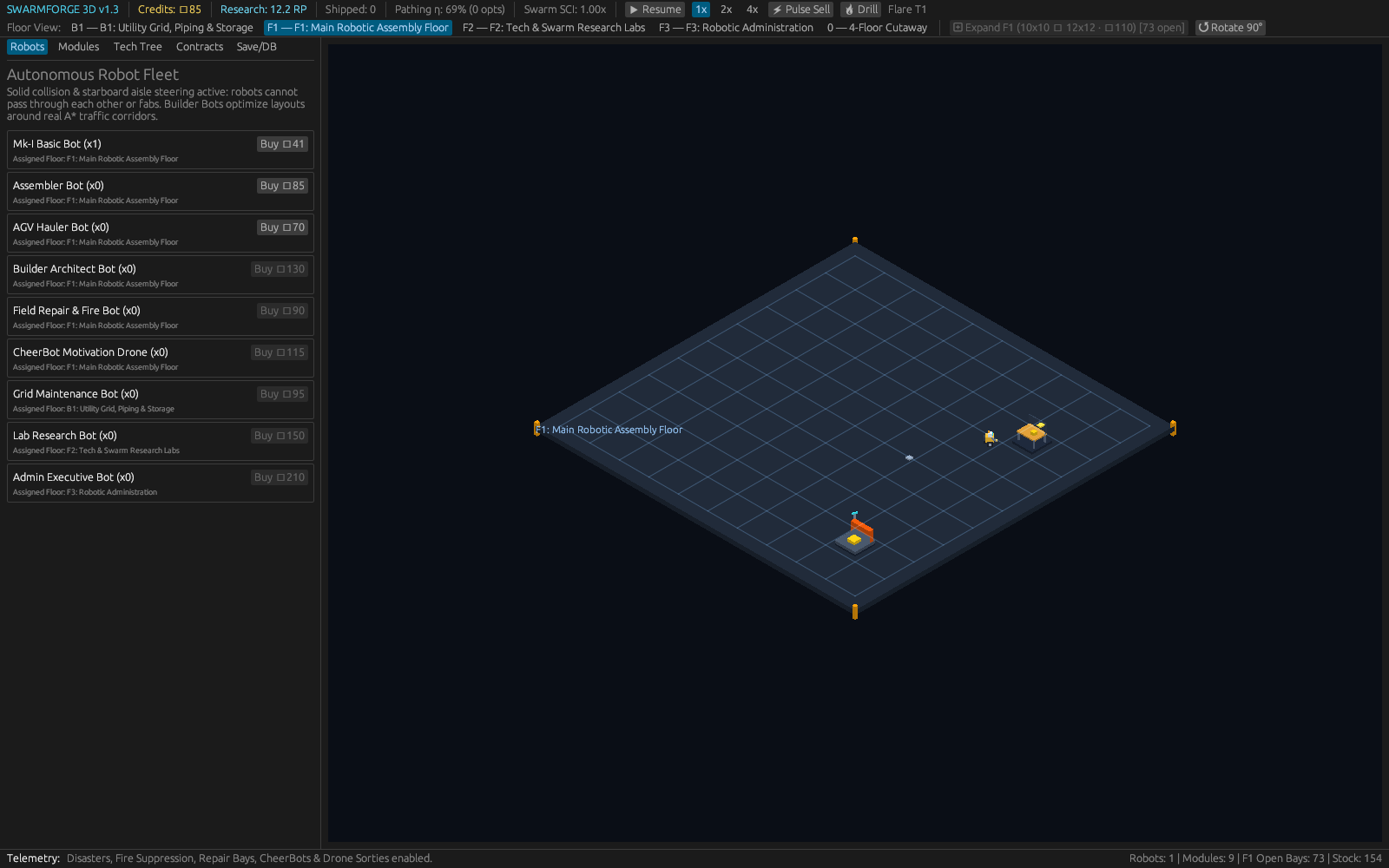
Starting with a single starter robot and basic fabrication cell, SwarmForge demonstrates immediately how adding specialized modules and unlocking swarm technologies compounds factory output while introducing spatial congestion. Place two high-rate assemblers too close to a narrow stairwell, and hauler bots visibly queue for passage; widen the aisle or add a nearby charging pad, and throughput rebounds smoothly.
In dense multi-module grids, the navigation engine smoothly routes builder bots around machinery bounding boxes without stalling or clipping, keeping multi-stage assembly chains supplied across all three factory floors[2]. Players can inspect live battery levels, task assignments, and production rates as robots transition between hauling, building, recharging, and emergency response.
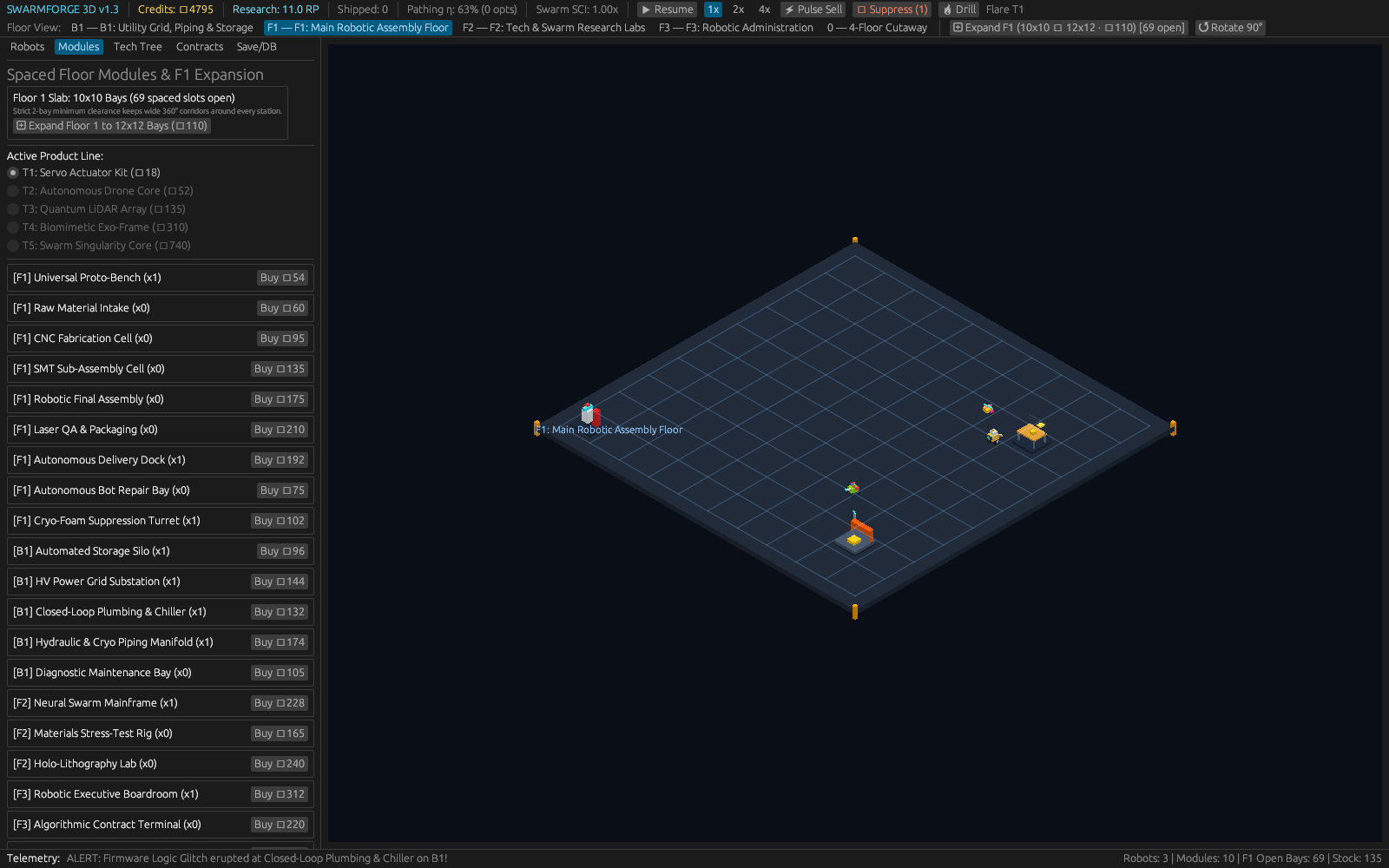
When fire hazards erupt near overworked high-throughput cells, fire-suppression towers automatically douse flames before damage spreads to neighboring stations, while cheer drones circulate to restore nearby robot morale and cycle speed—illustrating resilient multi-agent recovery in action[1]. Every interaction—whether placing a floor module, unlocking a swarm-tech node, or triggering a save snapshot—updates the deterministic simulation state cleanly.
Playing through an expanding three-floor factory in SwarmForge highlights why spatial layout and swarm coordination matter just as much as raw production speed. On the ground floor, an initial starter bot shuttles raw components between a tier-one fabricator and an output depot while periodically visiting a charging pad. As players unlock tier-two and tier-three assembly blueprints and expand upward onto the second and third floors via connecting stairwells, adding extra hauler and builder drones immediately boosts throughput—until narrow corridors or poorly placed charging pads create localized robot queues. Reorganizing fabrication cells into clean parallel lanes and positioning cheer drones along busy junctions eliminates congestion and accelerates cycle times. Meanwhile, placing fire-suppression towers within range of high-heat smelters and overclocked assemblers ensures that when an unexpected thermal fire breaks out, nearby suppression units extinguish the hazard automatically while builders repair any scorched floor tiles without halting the entire multi-floor supply chain. Saving to a local SQLite WAL slot lets players benchmark competing floor layouts from identical starting seeds.
| Subsystem | Verified Scope | Suite Result |
|---|---|---|
| Multi-Floor & Pathing | 3-floor grid & obstacle-aware builder steering | Verified in src/lib.rs |
| Assembly & Tech Tree | 5-tier production chains & swarm scaling multipliers | 6/6 core checks passed |
| Hazards & WGSL 3D | Fire suppression, cheer drones & SQLite WAL saves | 13 Rust modules (v1.3.0) |
4. Practical Scenarios: Who Uses SwarmForge & How
Simulation Gaming, Robotics Prototyping, and AI Courses
Players enjoy SwarmForge as a relaxing yet tactical factory-building game where spatial layout geometry directly shapes robot efficiency and multi-floor logistics. Because factories grow organically from a single floor to three-level robotic hubs, players can experiment freely with modular layouts, charging topologies, and defensive tower coverage. Whether optimizing a compact starter workshop or tuning a sprawling multi-tier assembly line with dozens of autonomous drones, every layout change produces immediate visual feedback in the isometric 3D viewport and measurable gains in production throughput, robot uptime, and hazard resilience.
Educators, game-development learners, and robotics students also use SwarmForge's clean 13-file Rust codebase to study how local collision avoidance, heuristic navigation, task queues, energy constraints, and morale/hazard fields interact inside an observable multi-agent sandbox. Because the entire simulation and isometric WGSL renderer run offline in native Rust with SQLite WAL save slots, players and students can iterate on compact or sprawling multi-floor designs anytime. Comparing throughput across competing floor layouts from identical seeded starting conditions gives learners direct, visual intuition for distributed scheduling bottlenecks and resilient swarm recovery.
What makes SwarmForge especially rewarding for both casual players and systems thinkers is seeing how simple local robot behaviors scale into complex factory-wide rhythms. A single builder or hauler bot following obstacle-aware steering rules is easy to predict; twenty bots sharing three stacked floors, finite battery reserves, and multi-stage assembly queues begin to exhibit real emergent bottlenecks—clusters waiting outside charging pads, idle assemblers starved of upstream parts, or stairwells congested during peak upgrades. Instead of burying those dynamics under opaque numbers, the isometric 3D view lets players spot slowdowns visually at a glance and fix them by tuning floor geometry, adding cheer drones, or investing in swarm coordination technologies.
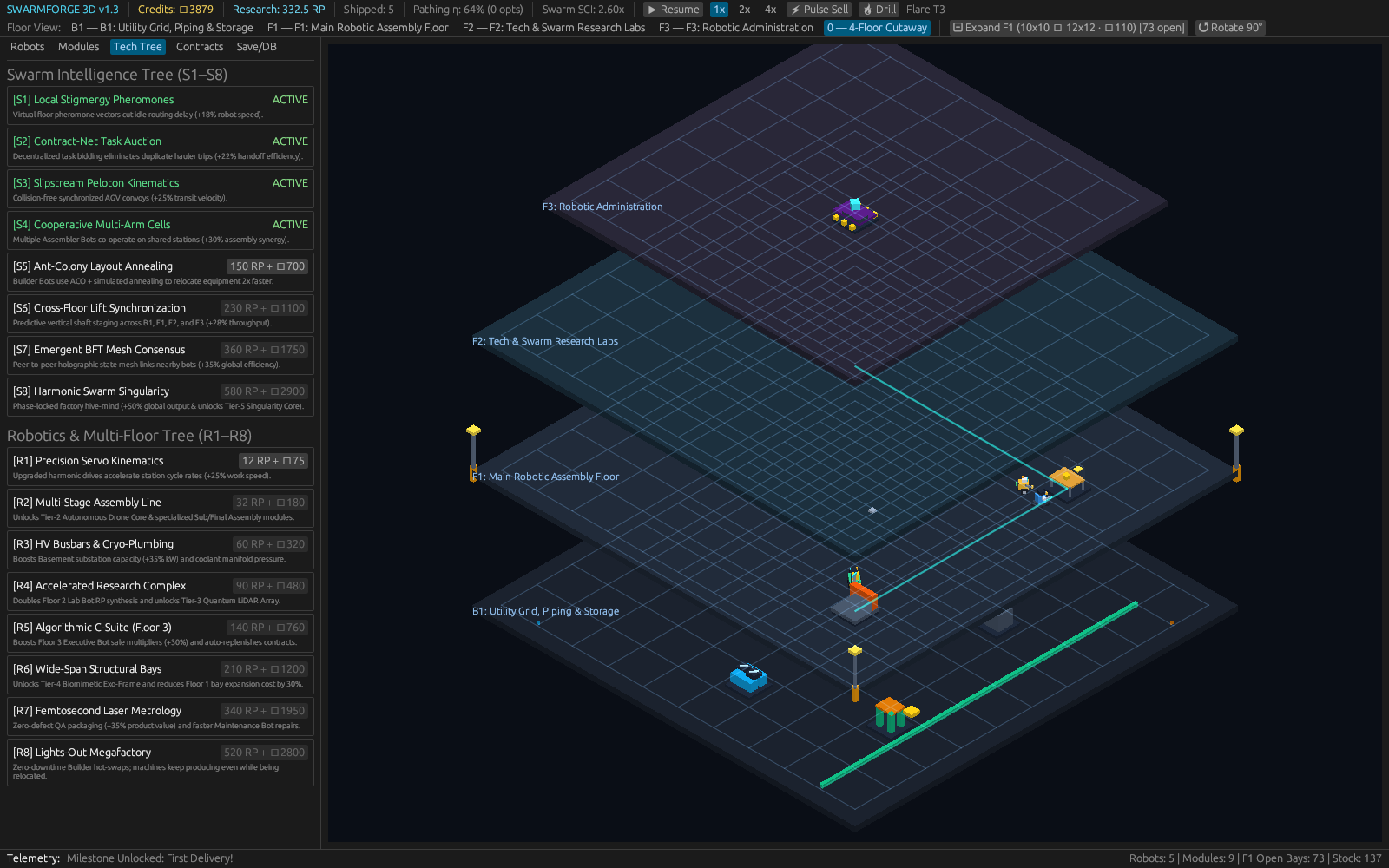
At the same time, treating thermal fires and suppression towers as live spatial hazards teaches resilient system design: a factory tuned purely for maximum speed without defensive coverage can grind to a halt from one localized spark, whereas balanced layouts recover smoothly and sustain high output across all five product tiers. Watching builder, hauler, and cheer drones coordinate dynamically across stacked floors turns classic multi-agent robotics challenges—congestion avoidance, task prioritization, energy budgeting, and fault recovery—into an intuitive and engaging interactive experience.
5. Open Access & Connections Across the CRV Science App Network
Open Access and Connections Across the CRV Science App Network
SwarmForge is released under the MIT license with full Rust source code, WGSL isometric shaders, unit checks, and build instructions on GitHub. Transparent module separation makes it easy to inspect how game mechanics map onto multi-agent simulation rules. From collision-free builder pathfinding and charging-pad scheduling to automated fire suppression and SQLite WAL persistence, every subsystem invites curious players and students to experiment with real-time factory logistics. Whether used as a relaxing strategy sandbox or a hands-on multi-agent systems demonstration, the codebase stays compact, readable, and completely self-contained offline.
Within the CRV Science Apps suite[3–19], SwarmForge pairs with WildFront BattleGrounds in the interactive simulation and game-theory pillar, Urban-Grid in multi-agent spatial flow and emergency resilience modeling, and Calc-Lab in numerical systems dynamics. Together, these applications show how deterministic engineering and clear visual feedback make complex multi-agent systems both intuitive and fun to explore. By uniting open Rust source modules with standardized citation metadata and verified simulation checks, SwarmForge stands ready for classrooms, hobbyists, and collaborative community exploration.
References
- [1] Rubenstein, M., Cornejo, A., & Nagpal, R. (2014). Programmable self-assembly in a thousand-robot swarm. Science. https://doi.org/10.1126/science.1254295
- [2] Hart, P., Nilsson, N., & Raphael, B. (1968). A Formal Basis for the Heuristic Determination of Minimum Cost Paths. IEEE Transactions on Systems Science and Cybernetics. https://doi.org/10.1109/tssc.1968.300136
- [3] White, B. P. (2026). The CRV Science App Network: Seventeen Open-Source Rust Programs for Science, Data, and Simulation. CRV Science App Preprint APP-PREPRINT-01 [cs.SE, cs.CE, q-bio.QM], v1.0.0. Hosted via CRV Science Apps Hub (https://crvscience.com/apps). https://doi.org/10.5281/zenodo.24222398
- [4] White, B. P. (2026). AeroFlyway: Tracking Bird Migration with Weather Radar, Skyglow Maps, and Nighttime Flight Calls. CRV Science App Preprint APP-PREPRINT-13 [q-bio.PE, physics.ao-ph, cs.GR], v0.6.0. Hosted via CRV Science Apps Hub (https://crvscience.com/apps). https://doi.org/10.5281/zenodo.24222366
- [5] White, B. P. (2026). BeoFold: Simulating How Proteins Fold Using Distributed Computing and State Networks. CRV Science App Preprint APP-PREPRINT-02 [q-bio.BM, physics.chem-ph, cs.DC], v1.4.0. Hosted via CRV Science Apps Hub (https://crvscience.com/apps). https://doi.org/10.5281/zenodo.24222370
- [6] White, B. P. (2026). Calc-Lab: Interactive Calculus, Linear Algebra, and Differential Equation Solver Workbench. CRV Science App Preprint APP-PREPRINT-03 [math.NA, cs.MS, cs.CY], v0.5.0. Hosted via CRV Science Apps Hub (https://crvscience.com/apps). https://doi.org/10.5281/zenodo.24222372
- [7] White, B. P. (2026). Causal-Atlas: Tracing How Genes and Drugs Turn Biological Pathways On and Off. CRV Science App Preprint APP-PREPRINT-04 [q-bio.MN, q-bio.GN, stat.ML], v0.2.0. Hosted via CRV Science Apps Hub (https://crvscience.com/apps). https://doi.org/10.5281/zenodo.24222376
- [8] White, B. P. (2026). Cit-Atlas: Mapping Citation Networks and Research Impact Across Scientific Papers. CRV Science App Preprint APP-PREPRINT-05 [cs.DL, cs.SI, physics.soc-ph], v1.8.0. Hosted via CRV Science Apps Hub (https://crvscience.com/apps). https://doi.org/10.5281/zenodo.24222380
- [9] White, B. P. (2026). EpiLedger: Privacy-Safe Disease Tracking, Clinical Text Screening, and Outbreak Monitoring. CRV Science App Preprint APP-PREPRINT-06 [cs.CR, q-bio.PE, stat.AP], v2.0.0. Hosted via CRV Science Apps Hub (https://crvscience.com/apps). https://doi.org/10.5281/zenodo.24222382
- [10] White, B. P. (2026). ITME: Simulating Four Billion Years of Life, Oceans, and Atmosphere Evolution. CRV Science App Preprint APP-PREPRINT-07 [q-bio.PE, nlin.AO, physics.bio-ph], v2.3.0. Hosted via CRV Science Apps Hub (https://crvscience.com/apps). https://doi.org/10.5281/zenodo.24222386
- [11] White, B. P. (2026). OSABT: All-in-One Toolkit for Plant Physiology, Survival Curves, Genetics, and Enzyme Kinetics. CRV Science App Preprint APP-PREPRINT-08 [q-bio.QM, stat.AP, cs.SE], v2.0.0. Hosted via CRV Science Apps Hub (https://crvscience.com/apps). https://doi.org/10.5281/zenodo.24222388
- [12] White, B. P. (2026). SAR-Atlas: Drug Design, Body Distribution Modeling, and Candidate Screening in Rust. CRV Science App Preprint APP-PREPRINT-09 [physics.chem-ph, q-bio.BM, cs.LG], v3.8.0. Hosted via CRV Science Apps Hub (https://crvscience.com/apps). https://doi.org/10.5281/zenodo.24222390
- [13] White, B. P. (2026). TerraTwin: Fast Climate Projections for Global Warming, Sea-Level Rise, and Arctic Change. CRV Science App Preprint APP-PREPRINT-10 [physics.ao-ph, cs.CE, stat.AP], v2.5.0. Hosted via CRV Science Apps Hub (https://crvscience.com/apps). https://doi.org/10.5281/zenodo.24222392
- [14] White, B. P. (2026). Urban-Grid: Modeling City Traffic, Emergency Response Coverage, and Earthquake Evacuation. CRV Science App Preprint APP-PREPRINT-11 [physics.soc-ph, cs.MA, cs.CE], v5.2.0. Hosted via CRV Science Apps Hub (https://crvscience.com/apps). https://doi.org/10.5281/zenodo.24222394
- [15] White, B. P. (2026). WildFront BattleGrounds: Turn-Based Hex Strategy Game with Voxel Graphics and Procedural Map Generation. CRV Science App Preprint APP-PREPRINT-12 [cs.GT, cs.GR, math.CO], v3.4.1. Hosted via CRV Science Apps Hub (https://crvscience.com/apps). https://doi.org/10.5281/zenodo.24222396
- [16] White, B. P. (2026). HelioProbe: Simulating Spacecraft Orbits, Deep-Space Telescopes, and Comet Tails in 3D. CRV Science App Preprint APP-PREPRINT-14 [astro-ph.EP, astro-ph.IM, cs.GR], v2.3.0. Hosted via CRV Science Apps Hub (https://crvscience.com/apps). https://doi.org/10.5281/zenodo.24244083
- [17] White, B. P. (2026). PopBio-Studio: Interactive Population Biology, Adaptive Landscapes, and Genetic Skyline Simulator. CRV Science App Preprint APP-PREPRINT-15 [q-bio.PE, q-bio.QM, stat.AP], v1.2.0. Hosted via CRV Science Apps Hub (https://crvscience.com/apps). https://doi.org/10.5281/zenodo.24244085
- [18] White, B. P. (2026). QuantaCrypt-Studio: Simulating Quantum Circuits, Quantum Key Distribution, and Post-Quantum Cryptography. CRV Science App Preprint APP-PREPRINT-16 [quant-ph, cs.CR, cs.MS], v2.2.0. Hosted via CRV Science Apps Hub (https://crvscience.com/apps). https://doi.org/10.5281/zenodo.24244089
- [19] White, B. P. (2026). SonoWing: Analyzing Bat Echolocation and Bird Calls with Spectrograms and Harmonic Tracking. CRV Science App Preprint APP-PREPRINT-17 [q-bio.NC, q-bio.PE, cs.SD], v1.1.0. Hosted via CRV Science Apps Hub (https://crvscience.com/apps). https://doi.org/10.5281/zenodo.24244091